Friday, July 4, 2014

Query to fetch the Parameter List and associated Value Sets of a Concurrent Program.

The following query will fetch the Parameter List and associated Value Sets of a Concurrent Program.

SELECT
fcpl.user_concurrent_program_name "Concurrent Program Name",
fcp.concurrent_program_name "Short Name",
fdfcuv.column_seq_num "Column Seq Number",
fdfcuv.end_user_column_name "Parameter Name",
fdfcuv.form_left_prompt "Prompt",
fdfcuv.enabled_flag " Enabled Flag",
fdfcuv.required_flag "Required Flag",
fdfcuv.display_flag "Display Flag",
fdfcuv.flex_value_set_id "Value Set Id",
ffvs.flex_value_set_name "Value Set Name",
flv.meaning "Default Type",
fdfcuv.DEFAULT_VALUE "Default Value"
FROM
fnd_concurrent_programs fcp,
fnd_concurrent_programs_tl fcpl,
fnd_descr_flex_col_usage_vl fdfcuv,
fnd_flex_value_sets ffvs,
fnd_lookup_values flv
WHERE
fcp.concurrent_program_id = fcpl.concurrent_program_id
--AND fcpl.user_concurrent_program_name = :conc_prg_name
AND fdfcuv.descriptive_flexfield_name = '$SRS$.'|| fcp.concurrent_program_name
AND ffvs.flex_value_set_id = fdfcuv.flex_value_set_id
AND flv.lookup_type(+) = 'FLEX_DEFAULT_TYPE'
AND flv.lookup_code(+) = fdfcuv.default_type
AND fcpl.LANGUAGE = USERENV ('LANG')
AND flv.LANGUAGE(+) = USERENV ('LANG')
ORDER BY fdfcuv.column_seq_num;

Thursday, July 3, 2014

How to trace a form/session in Oracle Apps

How to trace a form/session in Oracle Apps

We are getting the following error in Oracle when we are trying to cancel a PO.


We need to find out the code running behind the scenes to identify the issue. We need to generate a trace file and check that file.

Method 1: Generate debug log file

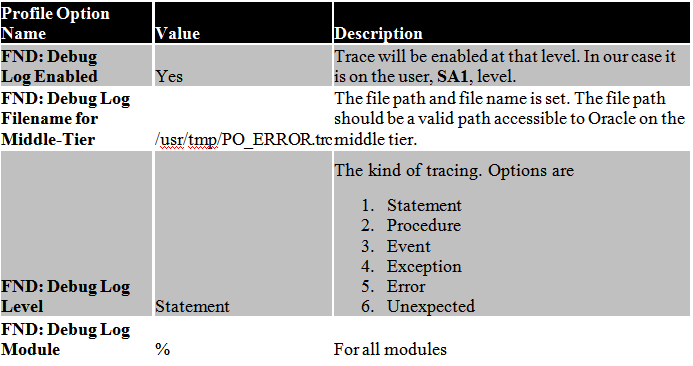
Step 1: Set profile option values

Set the following profile options on the User level so that it does not affect the entire application.


Responsibility: System Administrator

Navigation: Profile > System

Query for User = SA1 and Profile = FND%LOG%


Click on Find and change the values on user level.


Execute the query

select max(log_sequence) from fnd_log_messages


Note the number, i.e. 384854630

Step 2: Reproduce the error

Recreate the error in Oracle Apps and Execute the query

select * from fnd_log_messages
where log_sequence > 34854630 – Max seq num from query of Step 2
and module like ‘%’
order by log_sequence


Step 3: Check the log file

Log in to the middle tier operating system and go to the path set in the profile option name, FND: Debug Log Filename for Middle-Tier. We have set the value to /usr/tmp/PO_ERROR.trc. let us go to /usr/tmp directory

$ cd /usr/tmp


Now check for the trace file, PO_ERROR.trc
$ ls –l PO_ERROR.trc


Open the trace file and review

$ view PO_ERROR.trc


You can go through the file and analyse the issue.

Method 2: Generate session level trace

Step 1: Enable trace

Open the form and reach the point from which you want to enable trace and generate the file. Click on Help > Diagnostics > Trace > Regular Trace on the menu.


Once trace is enabled Oracle will give a popup message with the trace file name and location and mentioning that trace has been enabled.


Note the file name. It is DEV_ora_22141_SA1.trc. The location is the same as the value that you get from running the following query,

select * from v$parameter where name = ‘user_dump_dest’


Step 2: Replicate the error

Now you need to recreate the error in Oracle Apps.

Step 3: Turn off trace

We shall turn off trace or else every action we take on this session after the error will also be added into the trace file.

Click on Help > Diagnostics > Trace > No Trace

Now you will again get a popup message saying that tracing is disabled.


Step 4: Review the trace file

Let us go to the trace directory on the middle tier or application server.

$ cd /d02/oraprod/proddb/11.2.0/admin/DEV_eyerpqa/diag/rdbms/dev/DEV/trace


Search for the trace file

$ ls –ltr DEV_ora_22141_SA1.trc


Now that we know that the trace file has been generated, we shall view the file

$ view DEV_ora_22141_SA1.trc


The file is as follows,


Close the file. We shall generate a TKPROF output so that the file can be easily read.

Step 5: Generate TKPROF output

On the command prompt type in

$ tkprof DEV_ora_22141_SA1.trc output.tkp


Open the generated file, output.tkp

$ view output.tkp


Now it is a lot easier to identify all the SQLs in the trace file than the trace file.

The difference between the 2 methods


You can now decide for yourself what kind of trace you need and work accordingly.


Challa.

Tuesday, July 1, 2014

Concurrent program output delivery options in Oracle R12

Concurrent program output delivery options in Oracle R12

Oracle R12 has given the users a new set of delivery options. Users no longer need to run a concurrent program, save the output of the program on their local computer and then email, FTP, fax or print the output file. This task can be automatically handled directly from the SRS form.

Suppose if you had to print out a scheduled request everyday it would be a daily time consuming task. Oracle now allows you to get rid of this cumbersome process without the need of having a developer write code. It can be very simply done by configuring the request.

Here’s how it is done:

Submit a request


Click on Delivery Opts button


The Deliver form allows the output of the concurrent program to be sent to

Printer
Email
Fax
FTP directory
Email

Let us send the output as an email. Click on the Email tab


Click on From field


Notice that the From email id and the Subjects are populated automatically. The From email is being populated from the user settings.

Now enter the recipient email id


Press OK and submit the request. Once the request is over the email is sent out.


Notice that the PDF output is attached to the email.

FTP


Enter details


Check the FTP server directory


Print
To print the output of a concurrent program a printer has to be configured first.

Responsibility: System Administrator

Navigation: System Administration > Delivery Options


Click on Create


You can enter the IPP printer details in this form.

Important: The printer should be IPP enabled. IPP printers can be accessed via a URL. E.g. The IPP URL for the printer is

http://lndcds02.eu.*****.com:631/printers/DO_IT_LEX_T650

Host name: lndcds02.eu.*****.com
Port: 631
Printer Name: DO_IT_LEX_T650

If you enter the IPP URL in the web browser you will see the printer


Enter the IPP details in the form


Click on Apply button


The printer will appear in the Search page


The printer is completely setup now.

XDODelivery.cfg file has to be configured as well. This configuration is shown in this article. If the setup is not done, you will get errors in the OPP as shown below.

[12/3/13 2:14:43 AM] [OPPServiceThread1] Post-processing request 59483156.
[12/3/13 2:14:43 AM] [1940623:RT59483158] XML Publisher post-processing action complete.
[12/3/13 2:14:43 AM] [1940623:RT59483158] Completed post-processing actions for request 59483158.
[12/3/13 2:14:45 AM] [OPPServiceThread0] Post-processing request 59483157.
[12/3/13 6:18:15 AM] [OPPServiceThread1] Post-processing request 59483253.
[12/3/13 6:46:20 AM] [OPPServiceThread0] Post-processing request 59483263.
[12/3/13 6:46:20 AM] [1940623:RT59483263] Executing post-processing actions for request 59483263.
[12/3/13 6:46:20 AM] [1940623:RT59483263] Starting XML Publisher post-processing action.
[12/3/13 6:46:20 AM] [1940623:RT59483263]
Template code: XXEMPDET
Template app: AMW
Language: en
Territory: US
Output type: PDF
[12/3/13 6:46:21 AM] [1940623:RT59483263] XML Publisher post-processing action complete.
[12/3/13 6:46:21 AM] [1940623:RT59483263] CONC-OPP-DELIV BEGIN (REQID=59483263)
[12/3/13 6:46:21 AM] [1940623:RT59483263] Beginning print delivery
[12/3/13 6:46:21 AM] [UNEXPECTED] [1940623:RT59483263] java.lang.NumberFormatException: For input string: “631DO_IT_LEX_T650″
at java.lang.NumberFormatException.forInputString(NumberFormatException.java:48)
at java.lang.Integer.parseInt(Integer.java:498)
at java.lang.Integer.parseInt(Integer.java:539)
at oracle.apps.xdo.delivery.http.HTTPUtil.getPort(HTTPUtil.java:212)
at oracle.apps.xdo.delivery.http.HTTPRequest.(HTTPRequest.java:134)
at oracle.apps.xdo.delivery.ipp.IPPDeliveryRequestHandler.submitRequest(IPPDeliveryRequestHandler.java:183)
at oracle.apps.xdo.delivery.AbstractDeliveryRequest.submit(AbstractDeliveryRequest.java:1270)
at oracle.apps.fnd.cp.opp.PrintDeliveryProcessor.deliver(PrintDeliveryProcessor.java:81)
at oracle.apps.fnd.cp.opp.DeliveryProcessor.process(DeliveryProcessor.java:91)
at oracle.apps.fnd.cp.opp.OPPRequestThread.run(OPPRequestThread.java:176)
[12/3/13 6:46:21 AM] [1940623:RT59483263] Completed post-processing actions for request 59483263.

Fire the printer

Go to the SRS form and select the concurrent program.


Click on Delivery Opts button


Select Printers LOV


DONE IT Printer is selected automatically as it is the only printer setup. Click OK and submit the request. The output will be fired to the printer as well.

Important: If these attributes were to be set using PL/SQL then the API named, FND_DELIVERY, would have to be used.


Challa.

APP-FND-01564 Oracle error - 20160 in SUBMIT

ORA-4091: table applsys.fnd_concurrent_requests is mutating trigger/function may not see it.

I faced this issue when i tried creating an event alert on FND_CONCURRENT_REQUESTS table.

Solution Description :

You need to disable the event alert trigger going against the fnd_concurrent_requests table, and create a periodic alert instead.

*The trigger will be named ALR_<table_name>_IAR for insert and ALR_<table_name>_UAR for update.*
Make the changes as follows:

1. Login to sql/plus as APPS.
2. Disable the trigger:

sqlplus> alter trigger trigger_name disable;
e.g.
sqlplus> alter trigger ALR_FND_CONCURRENT_REQUESTS_UAR disable;

3. Create a new PERIODIC alert (cannot just convert Event to Periodic) on FND_CONCURRENT_REQUESTS and set the frequency of the Alert according to
your business need 
- e.g. once per business day. 
 This will allow a single email to report multiple request information as specified in the sql select statement.

Challa.

To Make a Concurrent Program Error Out or Warning.

I have come across this situation when i was in need to test an alert which i created to fire when any concurrent programs error out.So to check the alert created,I changed the procedure with the code as shown below which will error out.

As we all know there are two mandatory parameters that need to be passed for all the procedures called

1.ERRBUFF
2.RETCODE..

Based on the business process if there is any undefined exception occurred while running concurrent program, we can end the concurrent program with Error/Warning.

Define ERRBUFF as the first parameter and RETCODE as the second one. Mention them as OUT variable type.

CREATE PROCEDURE PROCEDURE_NAME (errbuf OUT VARCHAR2,retcode OUT VARCHAR2)

The retcode has three values returned by the concurrent manager

0--Success
1--Success & warning
2--Error

we can set the concurrent program to any of the above three statuses by using these values in the retcode parameter.

Example1:

BEGIN
.....
EXCEPTION
WHEN OTHERS THEN
FND_FILE.PUT_LINE(FND_FILE.LOG,'Unhandled exception occurred in package. ErrMsg: '||SQLERRM);
 retcode:='2';
END;

Example2:

CREATE OR REPLACE procedure APPS.XXXX_HTS_SO_UPDATE_PRC(ERRBUF OUT VARCHAR2,
RETCODE OUT NUMBER) is
v varchar2(10);
BEGIN
select vendor_id into v
from po_vendors
where vendor_id=15000;
EXCEPTION
WHEN OTHERS THEN
FND_FILE.PUT_LINE(FND_FILE.LOG,'Unhandled exception occurred in procedure. ErrMsg: '||SQLERRM);
retcode:='2';
END;


Even you can use fnd_concurrent.set_completion_Status to send the concurrent program to more status than success,error and warning.

Challa.